How does Focara know when to start each dish?
It adds up each recipe's prep and cook times and counts backward from your serve time, plus any extra time you ask for, so every dish starts when it needs to.
Focara Kitchen's meal planner builds a cooking timeline backward from the time you want to serve and gives each dish its own start alarm, so the main course, the sides, and the rolls all finish together.

Free on the App Store and Google Play.
Last updated
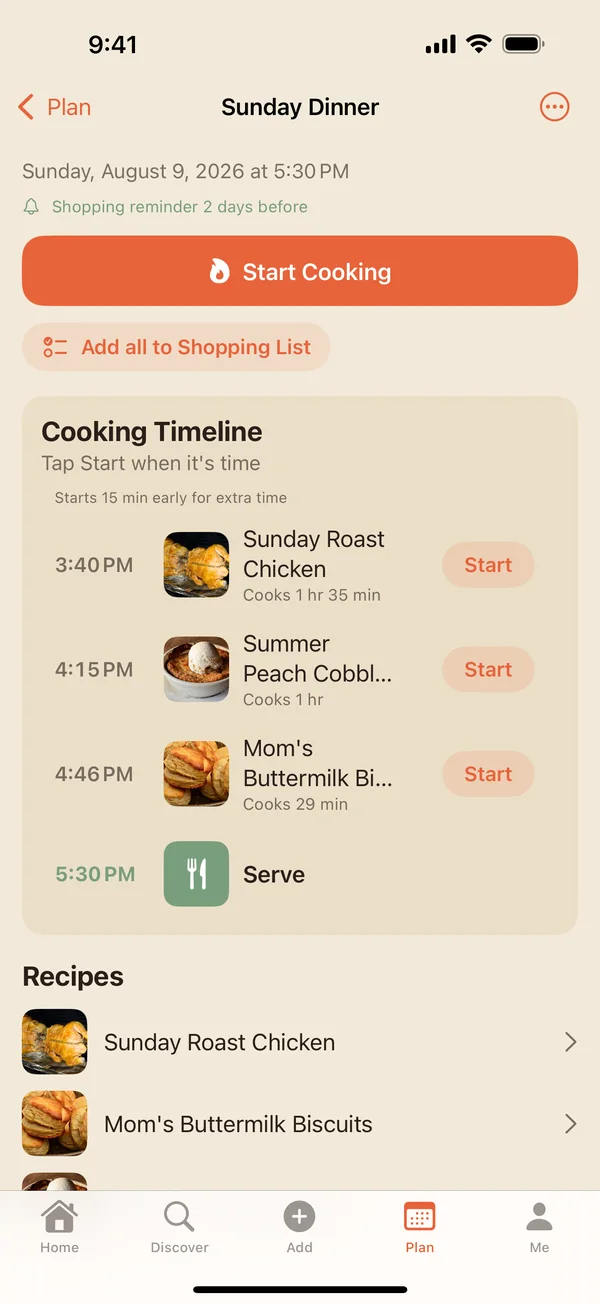
Thanksgiving, Christmas dinner, a birthday feast: the meals with the most moving parts are where a timeline helps most. Add every dish, set the time, and let the alarms keep track. You can print the plan to keep on the counter, with the timeline, each recipe on its own page, and a shopping list for the meal if you want one.
It adds up each recipe's prep and cook times and counts backward from your serve time, plus any extra time you ask for, so every dish starts when it needs to.
Yes, once you've allowed Focara's notifications. Each dish's start alarm rings even when your phone is locked or you've closed the app, and cooking timers keep running too.
Yes. Print the meal and choose what goes in: the timeline, each recipe on its own page, and a tick-box shopping list for the meal.
Yes. Tap Start Cooking to open the meal in Cook Mode, and switch between dishes as you go. Cook Mode keeps the screen awake with big, readable steps.
Or start from the Focara Kitchen homepage, read the frequently asked questions, or take the step-by-step tutorial.
Focara Kitchen is a free recipe box for iPhone and Android.
Free on the App Store and Google Play.